Network Devices 101: Key Components and Their Functions
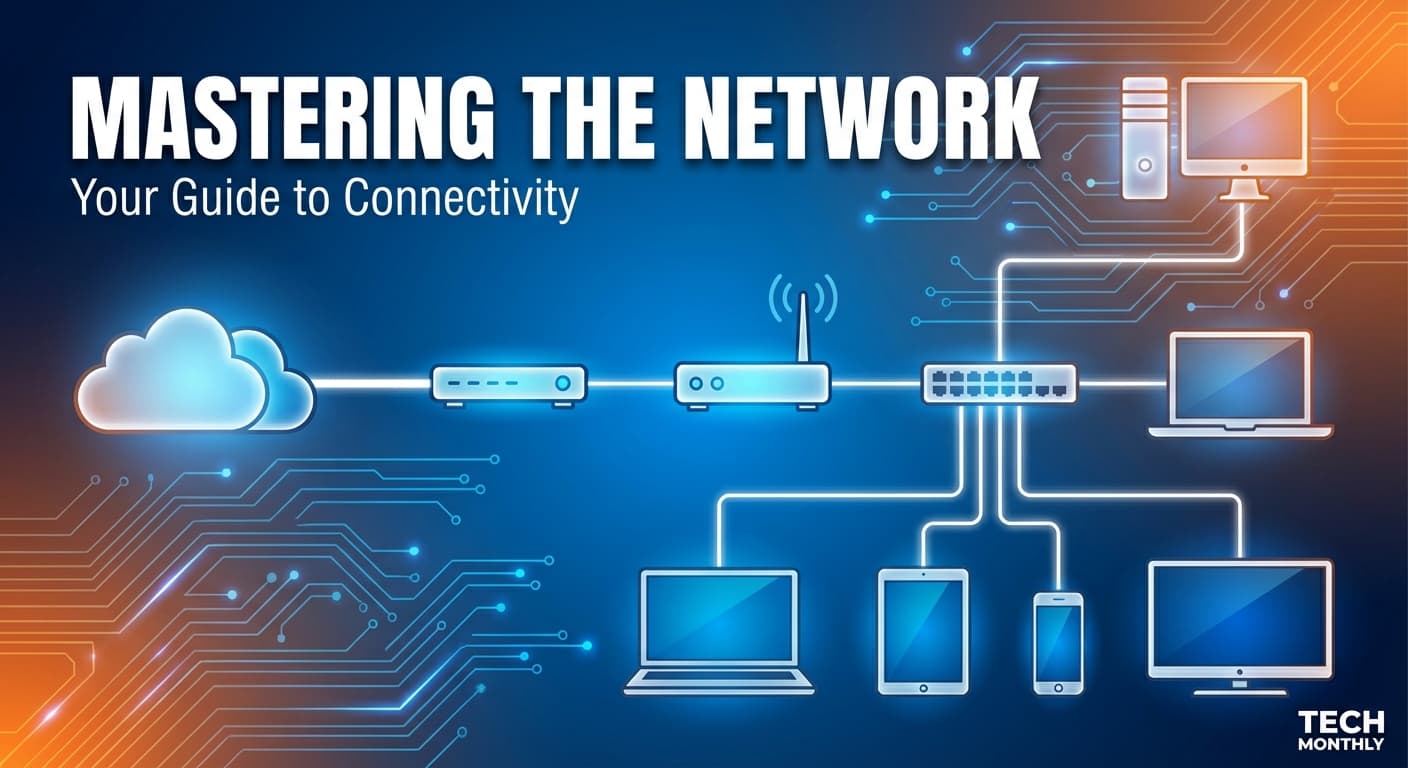
Before your API request hits a server, it passes through a small army of network devices that quietly do their jobs and never get credit. If any one of them messes up, your app is “down” and everyone suddenly becomes a network expert.
How the Internet Reaches Your Home or Office
When you open a website, the data does not teleport from a server to your laptop.
It flows through:
Your local network
Your internet service provider
Multiple networks across the internet
And finally reaches a server somewhere else
Between you and the internet sit several network devices, each with a very specific role.
Understanding these roles makes system design, debugging, and production deployments far less mysterious.
What Is a Modem?
Responsibility: Connect your local network to your Internet Service Provider (ISP).
A model is a device that communicates directly with your ISP using cable, fiber, or DSL. Your home network cannot speak the ISP’s language on its own. The modem translates between the two.
Think of the modem as:
The translator between your house and the outside world.
Important clarification:
A modem does not manage devices
A modem does not route traffic
A modem only establishes the internet connection
If the modem is down, you have zero internet. No amount of restarting your router will save you.
What Is a Router?
Responsibility: Direct traffic between devices and networks.
A router decides where packets should go.
Inside your home and office:
Your laptop
Your phone
Your TV
Your smart toaster
All of them share one internet connection. The router figures out:
Which device made which request
Where the response should go
How traffic moves between local devices and the internet
Modem vs Router
A modem connects you to the internet
The router manages traffic within and out of your network
Hub vs Switch: Working of Local Networks
Hub (Old and Mostly Useless)
Responsibility: Broadcast everything to everyone.
A hub sends incoming data to all connected devices, whether they asked for it or not.
You can think of a hub as someone shouting messages in a crowded room.
Problems:
Massive inefficiency
Security nightmare
Practically extinct for good reasons
Switch (What We Actually Use)
Responsibility: Send data only to the intended device.
A switch learns which device is connected to which port and forwards data intelligently.
Why switches matter:
Faster local communication
Better security
Foundation of modern LANs

What Is a Firewall?
Responsibility: Decide what traffic is allowed and what is blocked.
A firewall sits between networks and enforces security rules:
Which ports are open
Which IPs are allowed
Which traffic is suspicious
Firewalls exist at multiple levels:
Hardware firewalls
Software firewalls
Cloud firewalls
For backend engineers, this matters because:
A service can be “running” but unreachable
Ports can be blocked silently
Misconfigured firewalls cause legendary debugging sessions

What Is a Load Balancer?
Responsibility: Distribute traffic across multiple servers.
When one server is now enough, you add more. But users still need one entry point.
That’s the job of a load balancer.
Load balancers:
Improve performance
Increase reliability
Enable horizontal scaling
From a backend perspective:
Your API instances are stateless
The load balancer decides where each request goes
If one instance dies, traffic shifts automatically
This is how real production systems survive traffic without breaking.

How All These Devices Work Together
A simplified real-world flow looks like this:
Your device sends a request
Switch forwards it locally
The router decides it’s going outside
Firewall checks if it’s allowed
The modem sends it to the ISP
Internet happens
On the server side, a load balancer receives it
The load balancer forwards it to a backend service
Each device does one job, and does it well. This separation of responsibility is not accidental. It’s how networks scale and stay debuggable.

Why Software Engineers Should Care
Even if you never touch hardware:
APIs depend on routers, firewalls, and load balancers
“Works on localhost” dies in production because of networking
Cloud infrastructure is just these devices abstracted
Understanding network devices helps you:
Debug outages faster
Design scalable systems
Communicate better with the infra and DevOps teams
Stop blaming “the internet” for everything
Conclusion
Network devices are not magical boxes. They are specialised tools solving very specific problems.
Once you understand who does what, networking stops being scary and starts being predictable.
And predictable systems are the only ones worth building.
Want more?
Blog: https://blogs.kanishk.codes/
Twitter: https://x.com/kanishk_fr/
LinkedIn: https://linkedin.com/in/kanishk-chandna/
Instagram: https://instagram.com/kanishk__fr/