How Web Browsers Operate: A Simple Guide
Let’s start with a simple question.
What happens after you type a URL and press Enter?
You open your browser, type example.com, hit Enter…. and a website appears.
No explosions. No loading bars from the 2000s. Just a page.
Behind the scenes, though, your browser just ran a small orchestra of systems, all working together to turn into pixels.
This article explains that journey in simple language.
No memorisation. No deep engine internals. Just the flow.
What is a browser, really?
A browser is now “an app that opens a website”.
A browser is a translator and renderer.
It fetches raw files from the internet (HTML, CSS, JavaScript)
Understands what those files mean
Converts them into a visual page you can see and interact with
Think of a browser as:
A factory that turns code into a living, clickable interface.
High-level parts of a browser
At a very high level, a browser has a few main pieces:
Under Interface - what you interact with
Browser Engine - the coordinator
Rendering Engine - turns code into visuals
Networking - fetches files from servers
JavaScript Engine - runs JavaScript code
Storage & Other Helpers - cache, cookies, history, etc.
You don’t need to remember this list.
Just know that each part has one job.
The User Interface (the obvious part)
This is the part you already know:
Address bar
Tabs
Back / Forward buttons
Refresh button
Bookmark bar
Important thing to note:
The UI is separate from the web page.
Your browser’s tabs and buttons are not part of the website.
They are controlled by the browser itself.
Browser Engine vs Rendering Engine
This sounds scary. It’s not.
Browser Engine:
The manager. It connects the UI to everything else.Rendering Engine:
The artist. It takes HTML + CSS and paints pixels on the screen.
So:
Browser Engine says: “User typed a URL”
Rendering Engine says: “Cool, give me the files, I’ll draw the page”
Different browsers use different engines (like Chromium or Gecko), but the flow stays the same, which is all that matters right now.
Networking: fetching the website
When you press Enter, the browser:
Figures out which server to talk to
Sends a request over the internet
Downloads files like:
HTML
CSS
JavaScript
Images
Fonts
At this point, the browser has raw text files, not a page.
Yet.
HTML parsing and DOM creation
The browser starts with HTML.
HTML is just text.
The browser needs structure.
So it parses the HTML
What does parsing mean?
Parsing means: Reading something piece by piece and understanding its structure.
Example:
<div>
    <h1>Hello</h1>
    <p>World</p>
</div>
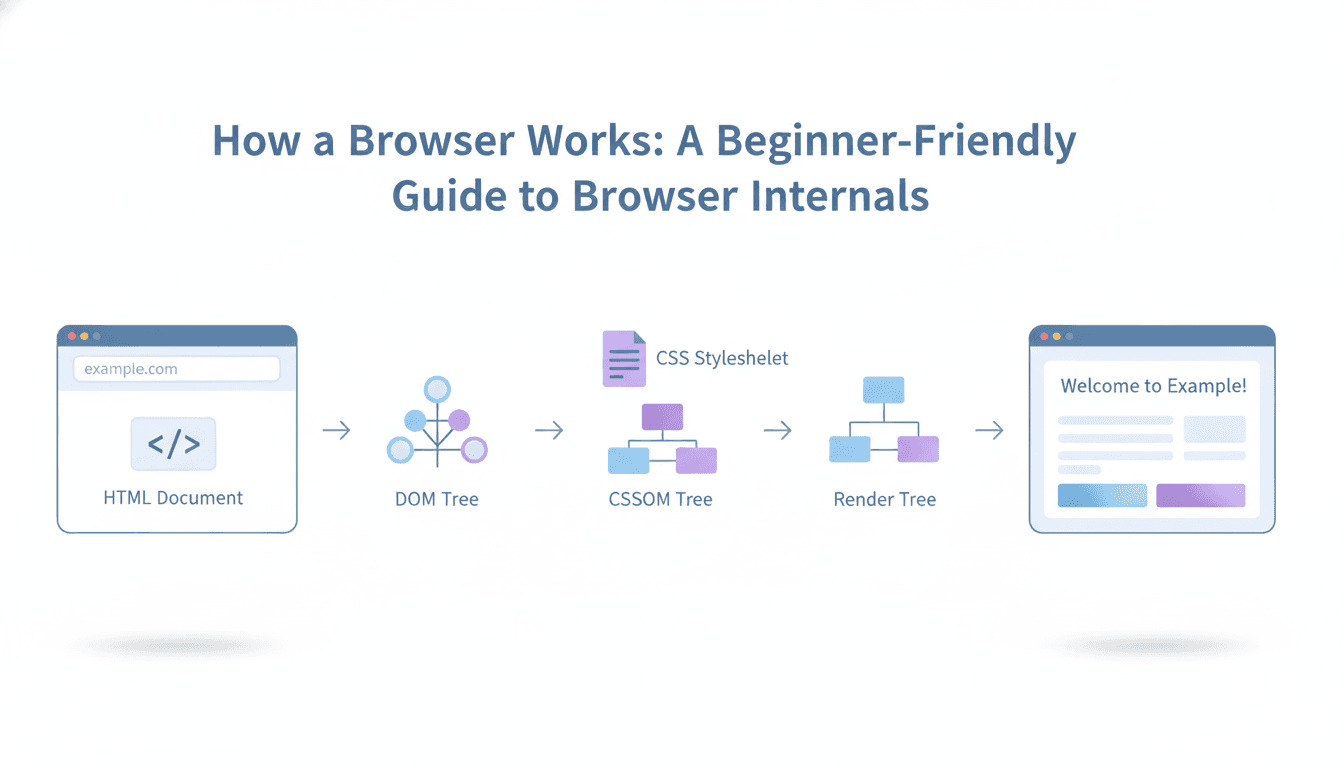
The browser converts this into a tree structure called the DOM.
DOM (Document Object Model)
The DOM is a tree
Every HTML element becomes a node
Parent elements contain child elements
Think of it like a family tree:
- is the parent
and
are children
This DOM is how the browser understands the page.
CSS parsing and CSSOM creation
Now CSS comes in.
CSS answers questions like:
What colour?
What size?
Where should this element sit?
The browser parses CSS and builds another structure called the CSSOM.
CSSOM (CSS Object Model)
Similar to the DOM
Represents styles and rules
Includes inheritance and priorities
So now the browser has:
DOM → structure
CSSOM → appearance
DOM + CSSOM = Render Tree
The browser now combines both.
Not every DOM element is visible.
“display: none” elements don’t show
Some nodes are just structural
The browser builds a Render Tree, which includes:
Only visible elements
Their final computed styles
This is the blueprint for drawing the page.
Layout (reflow): deciding positions
Now the browser asks:
Where does each element go?
How wide?
How tall?
Relative to what?
This step is called layout or reflow.
It’s like arranging furniture in a room before painting it.
Change the screen size?
Layout runs again.
Painting and display
Finally:
The browser paints pixels
Text
Colours
Borders
Images
Everything is sent to the screen
You see the website
This step can happen many times as:
JavaScript runs
Styles change
You scroll or resize
The big picture
Here’s the full story:
User types a URL
Browser fetches files
HTML → DOM
CSS → CSSOM
DOM + CSSOM → Render Tree
Layout calculates positions
Painting draws pixels
Page appears
That’s it.
Conclusion
You don’t need to remember:
All component names
Every step in detail
Engine differences
What matters is this mindset:
“A browser is a system that parses, understands, and renders content step-by-step.
Once that clicks, everything else becomes easier to learn later.
And congrats.
You now know more about browsers than most people who use them all day.
Want More?
Blog: https://blogs.kanishk.codes/
Twitter: https://x.com/kanishk_fr/
LinkedIn: https://linkedin.com/in/kanishk-chandna/
Instagram: https://instagram.com/kanishk__fr/